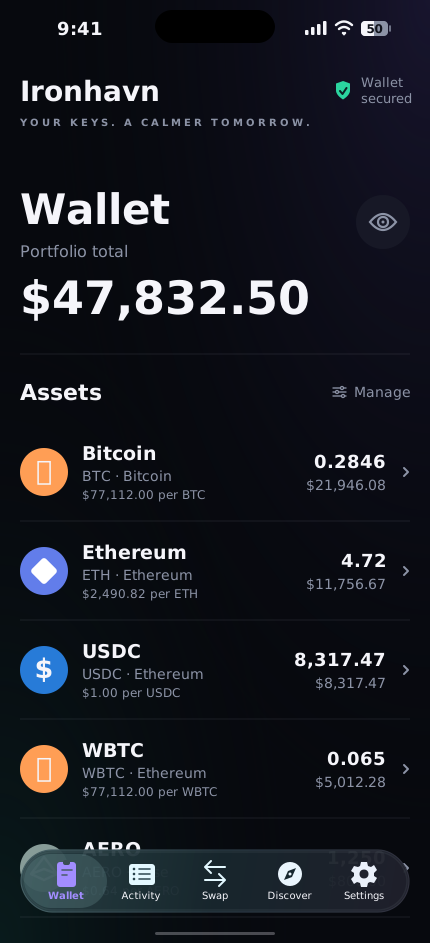
From checking a balance to reviewing an approval, keep the details that matter close at hand.
🗝️
New
Balances across wallets
See an asset’s combined balance, then choose a wallet to view its address and actions. Network labels help you keep each holding in context.
📋
New
Activity at a glance
Follow recent on-chain transfers and activity recorded in Ironhavn. See pending and failed transactions, with wallet labels and filters to find what you need.
🛡️
New
Token approval controls
Review spending allowances for tracked tokens across supported routers. Revoke an approval with device authentication and an on-chain transaction; network fees apply.
🔑
Keys that stay with you
Create or import independent wallets. Each recovery phrase is stored in the iOS Keychain on your device. Kamara Labs never has access to your keys.
✅
New
Verify your offline backup
Confirm selected recovery words against your offline copy before marking your backup complete. Phrase access requires authentication and automatically hides after 60 seconds.
🔒
Approve with your device
Sends and dApp signatures require Face ID, Touch ID, or your passcode. Choose an auto-lock timeout and lock your wallet whenever you need to.
🔄
Receive native Bitcoin
Share your dedicated Bitcoin address to receive BTC on the Bitcoin network. Keep Bitcoin separate from Ethereum and wrapped Bitcoin tokens.
🪙
New
Track custom tokens
Add an ERC-20 contract on a supported network. Ironhavn reads its token details on-chain and tracks its balance alongside your built-in assets.
🔤
Send using an ENS name
Enter a name.eth recipient and review the resolved wallet address before sending. Save familiar recipients in your contacts for next time.
🌐
Private dApp browsing
Explore dApps in Discover with private browsing enabled by default. Reset a session or clear stored site data, with HTTPS-only navigation and destination risk labels.
🔗
Connect by QR code
Use WalletConnect to pair with supported dApps on another screen. Saved sessions can reconnect when you reopen Ironhavn, and requests stay yours to approve or reject.
📚
Manage dApp access
Review the wallet permissions granted to connected sites and revoke browser sessions from Settings. Keep favorite dApps close with saved bookmarks.
👁️
Watch without importing keys
Add an EVM address or ENS name to track a wallet in read-only mode. Watch-only accounts let you inspect balances without bringing signing keys onto your phone.
📒
Recognize your recipients
Save verified addresses under familiar names. Optionally restrict direct sends to your own wallet and saved contacts, while reviewing each transfer before signing.
🔔
Transaction & security alerts
Enable on-device notifications for transaction outcomes and security events. Manage your alert preferences in Settings.